AI in Pyor runs only when you ask. It flags lines worth a look, groups files, and answers questions in the PR chat. It never posts anything to GitHub by itself: you decide what becomes a comment.
Turn it on
Go to Settings › AI and click Enable AI assistance. The first time, Pyor shows what AI can see and asks you to confirm. What AI can see on that page explains it again any time.
Choose who runs it
- Pyor AI: hosted by Pyor, no key or setup. It is a Teams feature, with an allowance per organization for each billing period, shown as N% used. Pick the Model and its Reasoning effort on the Pyor AI card. Personal code chooses which organization's allowance pays for AI on code no organization owns.
- Your providers: click Add a provider to use your own key (Anthropic, OpenAI, Gemini, Groq, OpenRouter, Ollama, any OpenAI-compatible endpoint). On desktop you can also add a coding agent you already pay for, such as Claude Code or Codex, and every agent in the ACP registry. Your own keys and agents work without a paid plan. A key stays in your OS Keychain on desktop, or in your browser on the web, and is never sent to Pyor's servers.
Who does what assigns a provider to each job: Ask AI (the PR chat), File grouping, and Inline hints.
Run a review
On the Changes tab, click Review. Its arrow (Choose what AI runs) picks the mode, which then becomes the button on every PR:
- Review: hints and grouping together. The default.
- Hints only.
- Group files only.
A run keeps going while you move around the app. The runs dock in the corner tracks every run, with Stop, Open and Dismiss, and Pyor sends a system notification when a result lands while you are away.
Hints
Each hint is a review comment anchored to a line, typed Possible bug, Security, Risk, Complexity or Test gap, at severity Info, Worth a look or High.
- Draft a comment turns a hint into a comment you can edit before posting. A fix to the anchored line comes as a GitHub suggested change.
- Dismiss hides it.
- The hints rail lists them all, with Filter hints, a type filter and severity chips.
- Show in the Review popover switches between Diff + list, Diff only and Off.
Hints read the repository's own rules (CLAUDE.md, AGENTS.md and rule files, from the PR's base) and your Review guidelines. Large PRs are reviewed in parts, so every file still gets a look.
The verdict
When hints finish, the Review popover gives a verdict, Looks ready, Needs changes or Not ready, with the reason.
Make reviews stricter or focused
Write it in Settings › AI › Preferences › Review guidelines. It is markdown, and it steers what hints flag and how they read: for example, Be strict about changes to existing code; new self-contained files only need a light pass. Guidelines steer hints only, not grouping or the chat.
Review panel
Add more than one reviewer under Who does what › Inline hints › Add reviewer to review as a panel. Each reviewer writes its own hints, duplicates merge, and then the panel votes: a hint stays only when most of the panel agrees. Give each reviewer a role, such as Bugs & security, Tests & maintainability, Performance, API & migrations, Docs, Design & UX or your own Custom role, or leave Picked for each PR to let Pyor choose from what the PR touches.
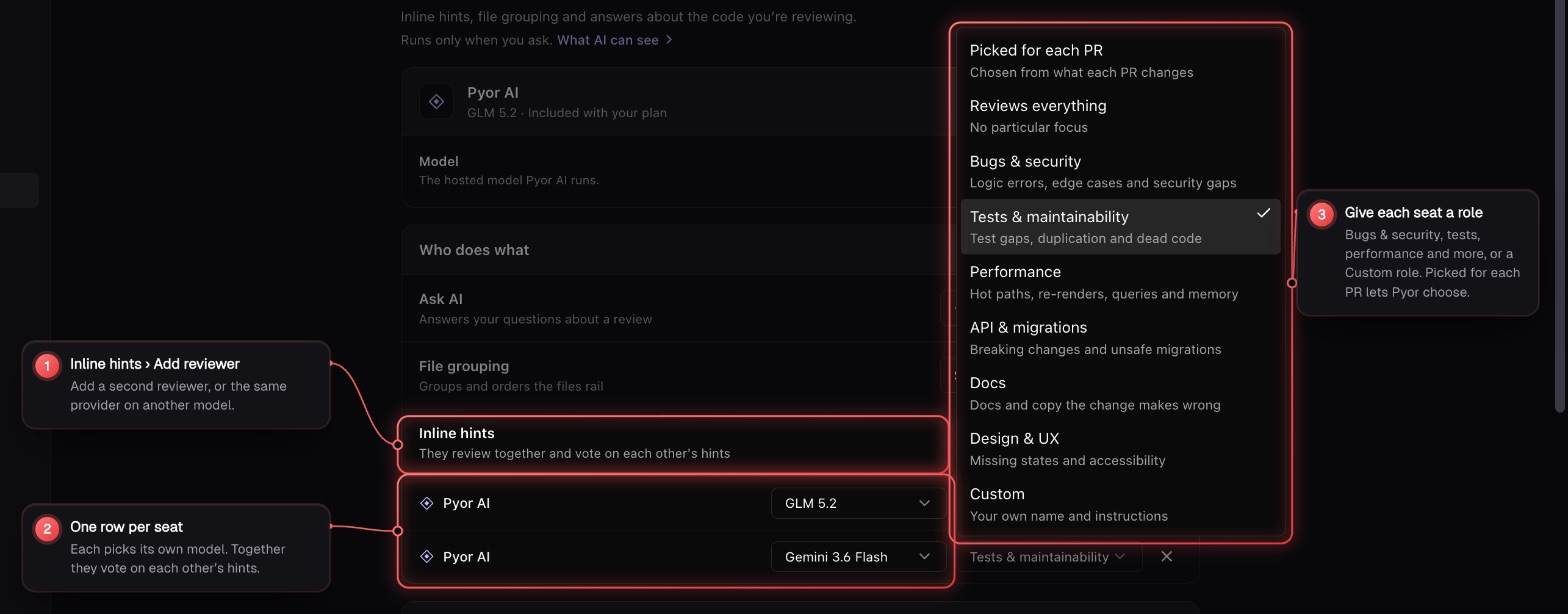
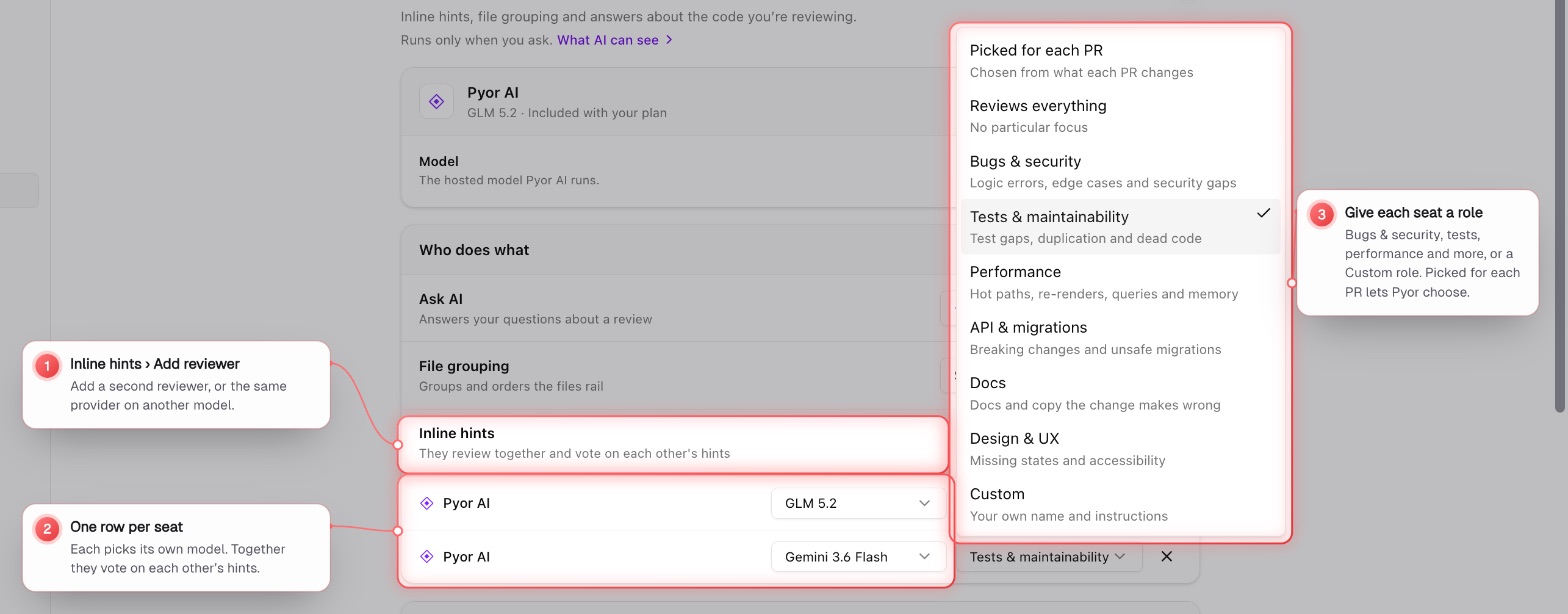
A repository can keep its own panel: Review › Reviewers for this repo, where Suggest from this repo proposes one. A review after a push keeps the open hints and marks the ones whose code is gone as resolved.